Structured Cabling and WiFi

Structured Cabling and WiFi

When first implemented, LANs (Local Area Networks) were built with physical connections. Cables capable of carrying image and information connected a group of computers in one area, on one floor or in one building. As technology has advanced, the functioning definition has shifted. Particularly with the onset and mainstream use of wireless technology, the way we deal with computer networks has changed, both at home and on the job. Some networks will always need to be wired physically, mainly for the degree of security this lends to delicate and important information. However, as more business is done online, and greater scope and bandwidth are required in the corporate world, more folks are turing to wireless solutions to power their work and their lives.

Wi Fi itself refers to a system of standardized and controlled devices, all of which are compatible and will connect you to the world wide web wirelessly. To assume this system requires absolutely no wiring, however, is false. Wireless hubs need to be connected to a larger network still, usually through cable (like the television) or telecom cable (like the phone.) The internet is then connected to a router which disperses a wireless signal that computers and wireless-capable devices pick up and connect to. Houses, offices, hotels, coffee shops and even churches are often set up with their very own wireless network, allowing people to connect to information with as little effort as possible.

Now, anyone who has actually used a wireless connection can tell you that they are far from perfect. When things go as planned, all the links in the wireless chain are hooked up securely and the signal is strong. Unfortunately, sometimes the router has to be restarted. Or the signal is not turned up high enough. Or too many people enter the same network at once and some individuals get kicked off. Worst case, you loose information in the drop-offs, or cannot stream a video soon enough to present it at a meeting. Businesses are particularly interested in seeking solutions to network issues, and will usually pay whatever is necessary to be able to depend on their wireless network. It has it’s pitfalls, but Wifi is the most current technology and admittedly has the greatest potential for functionality and ease in most settings. With proper installation and technical maintenance, it fulfills its potential.

Most personal residences, and many small businesses get their wireless connections from their local cable companies in a grouping of three: cable television, wireless internet, and land-line phone. This generally requires the installation of these systems into the building by a trained cabling technician, who runs cables to televisions and to wireless routers and turns on the signal. This creates a wireless hotspot that is generally password-protected so that the resident has control over who can participate in this mini-version of a LAN. Laptops no longer need to be hardwired to the internet to surf the web, but skilled cabling is still required to set up and run the wireless internet in your home or business. The application is different than in years past, but much of the structure is really the same.

Environmental Initiatives and Structured Cabling

Environmental Initiatives and Structured Cabling

One of the largest and ever growing trends in business at large is the environmental initiative. This also holds true in the structured cabling and telecommunications networking world. Globally, a turn towards green technologies and a new attention to sustainability and energy conservation has been palpably clear over the last twenty years. Larger names in the manufacturing of network technologies and materials, like Cisco and Motorola have vast environmental departments that specialize in research and development to create network equipment that makes less waste. In an industry where the nuts and bolts are built around metals and plastics, it is important to discover ways to utilize materials that can be produced with limited environmental impact, and that also, through application, decrease environmental impacts like greenhouse gas emissions and energy seepage.

Government support from programs like CGI (Clinton Global Initiative) which was established in 2005 by former President Bill Clinton, bring together giants of the industry, CEOs and the heads of environmental NGOs to stir up comprehensive solutions to the environmental issues popping up all over the world. Cisco, one of the worlds largest telecommunications technology companies is directly involved with CGI and works to encourage companies applying their technologies to be environmentally responsible as well. One of their most recent actions is to promote the use of video technologies in corporate settings. If companies that have distant and variant branches need leadership to meet company-wide, traditionally, they would have to commute long distances to be in the same room. The carbon footprint of this automotive or airplane travel can be reduced and even eliminated if video technology is developed and installed in a way that not only supplements, but eliminates the need for travel. Turn on the screen and the camera, and you are all in the same room. Particularly as such technology has become more producible and more affordable, it does appear that is has the potential to replace the business practice of face-to-face conferences and meetings.

It is important that individuals at all levels of networking technology pay careful attention to the effects that environmental awareness has on the industry. Whether you are a cabling installer, a network-service salesperson, or a company CEO the business of cabling will go the way that the environmental resources dictate. Especially as the federal government and philanthropic organizations and lobbyists grow in force toward green concerns, so too will the economy that decided the wavers of the free market. As consumers begin to morally expect environmental awareness from the products and services they employ, businesses also find that it is fiscally responsible. Conservationist methods generally save us all money, which in the end, is where the ‘buck stops.’ Seeking out these solutions can set you apart from other companies and laborers around you and give you the extra boost you need to be successful. Look into trainings and courses that will arm you with the tools necessary to keep up with this growing trend. Trade is dictated by the resources available, and structured cabling is no exception.

Cabling Staffing Services: A Win Win

Cabling Staffing Services: A Win Win

As telecommunication technology becomes more commonplace, the demand for workers in cabling continues to grow. It seems every home, office and business needs cabling, not only for television and phone, but also for wifi and internal computer networking. Especially if you are in the process of putting together a company to meet this demand in cabling installation, it is important to cultivate a relationship with a trusted staffing agency.

Some companies will specialize in long term placement, while others will be able to send you temporary workers to supplement your staff on larger or more complex projects. The most accommodating staffing agencies will be broad enough to cater to both needs. A cabling staffing agency provides the prospective employer with several invaluable services. Basically, a staffing agency that serves the world of technology installation, maintenance, and operation does the job of screening and hiring for you. They accept resumes and organize applicants based on their qualifications. They conduct the interview process and produce for you the very best professionals to hire. This means that you do not have to staff or train any logistical employees do go through these hiring processes for you. Also, because staffing agencies are professional staffers, they are more likely to attract and find qualified and certified workers than an open call. Some cabling staffing agencies retain their employees and even provide payment to the workers saving you the mess of payroll.

Cabling staffing can be a difficult task for a cabling company. Your job, after all, is to perform the complicated service of wiring and cabling with the newest technologies in a professional setting while saving time and money, not hiring new techs. If you can reduce the cost of seeking new technicians while also guaranteeing the quality of their work it is a win-win both for you and your clients. The benefit to small companies are even more specific. If the staff you keep is small but effective, the use of a cabling staffing agency will allow you to say yes to larger jobs that might otherwise be outside of your everyday manpower and skill abilities. The extra labor is readily available with a staffing agency and you won’t have a waiting period to deal with search and hire. You can begin projects immediately. Even if you work at a larger operation, this boost to speed and efficiency will aid in the quality of service you can provide and help generate positive customer reviews and in turn, more business.

Cabling, in particular Structured Cabling has become an exceedingly more standardized business over the last twenty years. The individuals who choose to train in the installation, innovation and upkeep of these technologies must be willing to train and work hard to stay up to date and relevant in the field. The application of companies that do cabling staffing is not only good business sense, but also good business ethics. Beyond the net of interpersonal politics, these cabling staffing agencies help to put qualified people into jobs where they, and there skills are needed.

Structured Cabling Standardization

Structured Cabling Standardization

As this most modern systems, standardization is structured cabling come about not through arbitrary decision, but through necessity.  In the beginning of office, home and campus computer networking, the systems were usually fairly small, or at least localized to one space.  No standards of use or organization were needed so long as these systems remained small.  With the natural growth of these networks, however, it became obvious to those in the business of supplying, installing and maintaining them, that some standards needed to be put in place.  Standardization would be useful, if only for the reason that it would make future growth, integration and management more effective.

Originally these standards in cabling were specific to the provider.  If the network system was from IBM or a smaller carrier, each of those carriers had their own way of doing things.  This provider-specific standardization worked so long as networks remained curtailed to single offices and required the materials of only one network company.  As corporations grew, networks needed to grow with them, expanding to multiple sites and transactions.  As technology shifted, businesses also became more reliant on networks to conduct operations.  While growth is good for business, it began to create issues of integration.  If one office branch had one network provider, and thus one set of materials and systems standards, it became difficult to find compatibility with another branch that might have a whole other set of standards and materials.  This went beyond inconvenience, it began to cost companies money.  Especially with the idea and necessity of globally interactive economic connection became a reality, it became essential that overarching standards be put in place for cable networking.

In 1991 The TIA/EIA, (Telecommunications Industry Association/ElectronicIndustries Association) created standards for structured cabling and inter-networking.  These standards were then updated in 1995.  As networks are designed and expanded they began to use up-to-date TIA/EIA cabling standards. These particulars ensure that new technologies are compatible with each other, and that they can also work with older technologies as well.   They apply to the wiring of such systems as:  100BASE-T4, Token Ring 4, Token Ring 16 Mb/s, FDDI, 100VGAnyLAN, 100BASE-TX, 10BASE-T, and LocalTalk.  568 recommends structures for the main elements of networking, including:

  • Building Entrance Requirements

    Considerations for the point of origin where the cabling first enters the building.

  • Equipment Room Storage

    A space for the pricier and complicated tools and materials.

  • Backbone Cabling (or vertical cabling)

    The organization that carries info between different floors and broad spaces.

  • Horizontal Cabling

    This is the organization that carries info throughout a single floor.

  • Work Area

    This is the organization that carries info throughout s single work station.

  • Clearly, different office set ups will require different spacial problem solving and network webbing within this standardization.  Topologies will differ depending on the specific needs of the company.  This is however, a good baseline understanding to start from, beginning with a broad scope and becoming more specific to smaller nodes of the communication systems.

How to Build an Ethernet Cable from Scratch

How to Build an Ethernet Cable from Scratch

When setting up a networking system for office or home you need an appropriate length of cable. If the architecture is older, or repurposed, your building may not have been designed with networking in mind. You might need cables that are shorter or longer than standard sizes. If you go to your local electronics or computer store, they will carry 6, 25 and 50 foot pre-packaged cables. However, if you need differing lengths, buying tools in bulk and building your own will save you money, even considering that you may waste a bit of material as you learn through trial and error.

There are surplus websites that sell cabling materials for cheap. Sometimes, checking more general sites like Amazon.com and Ebay.com can lead you to deals on the equipment you need.. You will need a spool of the necessary cable depending on what you need for your network. Most will require a version of ethernet cabling, generally known as RJ-45 or CAT 5. If your hardware is a bit newer, you will need ‘straight-through’ cabling. If you are building your network from the ground up, it is advisable to seek the most modern systems. They will last longer, as will the period of time professionals can repair them. If you are stuck with older technology, you might find that you need to use ‘cross-over’ cable to connect multiple hubs or devise-switches.

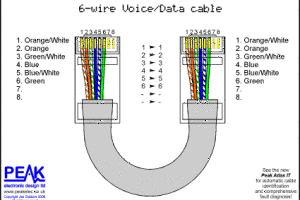
Once you have determined the needed cable, purchase a spool with PVC or plenum jackets. PVC is cheaper and plenum is safer, though PVC is a little more workable, as a material at large. You will also need to buy plugs- those square-ish plastic things you find at the ends of network cables- and a pair of wire cutters. Two more specialized tools that you may need to find or buy are a wire stripper and a pair of crimpers. Once you have assembled your tools, you can begin. Measure your spooled cable to the length you need and strip the jacket off at both ends to about an inch. Untwist the internal wires. For straight cabling, organize the wires by color as such from right to left- brown, whitebrown, green, bluewhite, blue, greenwhite, orange, and orangewhite. If your needs imply cross-over cabling the two ends will be different. From right to left on the first end- brown, brownwhite, orange, bluewhite, blue, orangewhite, green, greenwhite. At the opposite end, the wires are, from right to left – brown, brownwhite, green, bluewhite, blue, greenwhite, orange, orangewhite.

Unfurl the wires and pinch them close together to trim them evenly down to a fourth of an inch. Slide them into the plug with the clip side facing down. Look for a tight fit without smashing. Be sure that the wires touch the golden leads inside the plug. Use your crimper to crimp down the plug. To make sure your cable is effective, plug it into your network and test it. If it works, Eureka! You have yourself a custom ethernet cable.

Ethernet Network Cable Splitter Misconceptions

Ethernet Network Cable Splitter Misconceptions

With some research, you may find that lots of people think ethernet splitters are a means by which to share their internet connection. That is, after all a logical thought. Based on the name of the tool the implication is that a Splitter could split anything ethernet-related. Unfortunately, it is assumptions like this that leave many consumers staring in vain at their computers wondering why the ethernet splitter they just purchased won’t do what they think it will.

This type network cable splitter is not constructed for the distribution of internet between multiple computers. So if it’s not meant to split the internet connection, what is it designed for? An ethernet splitter is made to diminish the amount of ethernet cable required to connect two networks together. In this case, ‘network’ refers to the internet, but instead to two or more computers to LANs (Local Area Networks) that you are trying to join together. Splitters are used in sets of at least two. There are four wires of ethernet cable in normal LAN movement, but inside these cables, there are eight wires. A splitter reduces cable usage by directing two flows of energy down a single cable. This saves in actual cable footage, but also in cable ad wire disorganization and clutter in the office or home. If you are trying to connect several computers with ethernet cable to several others in another nearby space, you could use two pairs of cables but, with the application of two splitters, you need only one pair. This is the most common set up to which ethernet cable splitters are applied.

Another issue with ethernet splitters is that people don’t receive the information that splitters can only function in pairs. Most individuals get a single splitter and find themselves frustrated when none of their connections work. Multiple splitters are needed because the information going through ethernet cable requires merging on one side before it enters and separation at the other side where it comes out. The use of a single splitter allows data to enter the cable, however when it gets to the other end of said cable, there is a disconnect. Because the flows of information are merged, when they reach the other, receiving end, there is some confusion on the part of the accepting computer. The end computer recognizes one wire with two flows of data. This issue is resolved by utilizing a splitter that properly separates the one flow of information back to two separate rivers before forwarding it through to the recipient end. This is the reason why using splitters in pair is so important. Without the appropriate splitters, this sort of cabling won’t work. Splitters are an excellent way of connecting several computers together over a network while cutting back on the length of cable needed for a LAN. Unfortunately, different cabling tools are required for dispersing any sort of internet setup.

How is an Ethernet LAN cabled?

How is an Ethernet LAN cabled?

If you work at an office or business that uses an LAN (Local Area Network) you may understand the way such networking functions to connect you to your colleagues and help you do your job. However, depending on your level of tech-savvyness, you may have less knowledge about the mechanics of such networks and how they work in a physical sense. The Ethernet LAN was conceived and invented in the 70s, and by the late 80s most businesses employed some form of ethernet networking. Originally, ethernet had several competing networking types: Token Bus and Token Ring, but won out quickly due mostly to the adaptability and convenience of the cabling systems involved.

Initially ethernet networks ran over coaxial cabling. Coaxial cabling is a somewhat complex system made of copper and plastic. In basic terms, there is a central core, which is the main conductor of energy and information, that for all intents and purposes is a copper wire. This is surrounded by an insulator incased in a braided metal shield, generally also made of copper. The entire cable is encased in a plastic tubing jacket to protect the current. Its main uses, besides LANs include radio frequency transmissions and television cable. Because the current of a coaxial cable moves between the outer metal shield and the core it is safe and functional to install near other metal systems such as plumbing and electric wiring without fear of signal erosion or interference. These cables, however, have some major flaws that caused them to eventually be replaced in ethernet LAN systems. No matter how well constructed the metal shielding of a coaxial cable, there is room for signal leakage, which in simple terms is like when two radio stations blur, fuzz and play at the same time, which is not only irritating, but keeps you from listening effectively to either. Because the braided shield has gaps there is a greater likelihood of electromagnetic leakage of this kind, which in an office using ethernet, could bring business to a screeching halt.

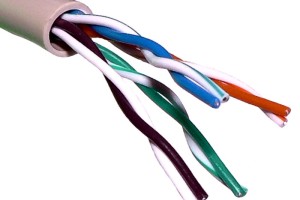
As Ethernet systems became standardized, the switch was made to Twisted Pair cabling. Originally invented by Alexander Graham Bell for telephone networking, this form of cabling has gone through many evolutions and has many applications. The very basic make up of a Twisted Pair cable is when a balanced pair – two wires carrying opposite and equal signals across a distance- are twisted together to reduce interference between the two. The destination insertion differentiates between the signals and reduces the kind of electromagnetic radiation that can exist with coaxial cables. Inside a single physical cable there can be several different internal twisted pairs, allowing for more complicated and reliable bandwidth and clearer communication. The wiring is often color coded for the sake of clarity. You may hear or see these twisted pair cables referred to as Cat3, Cat4, Cat5, Cat5e, Cat6, Cat6a, ClassF and ClassFa. They are all different generations of the same basic cabling that allows information to be shared over LANs. These cables transmit the information needed to accomplish business tasks in most offices.

Universal Network Cable

Universal Network Cable

As the world of technology evolves, people are connecting in many different ways. While twenty years ago some businesses were still run on paper, (without computers), today most businesses require computer and internet access to thrive. Particularly as businesses expand, the speed of communication is becoming crucial to success.

One of the most popular applications of computer technology, especially in corporate settings, is computer networking. These internal networks allow companies to maintain consistent communication from within, usually carrying email servers through which most business is done. One of the first means of networking is a T1 system, which works like an internal phone system. Developed by Bell Labs in the 1960s, T1 networks ran along telephone lines and were dialed into, much like the early means of connecting to the World Wide Web. These days this system has been digitized and ‘T1’ generally refers to any system that runs at a 1.544 Mnit/s line rate.

In the 1980s, Ethernet networking began to be widely utilized in the world of business. Originally, Local Area Networks or LANs were a small web connected within a single building or office. Ethernet replaced area networks with ethernet data cables over which visual information is broken into frames, and travels more quickly and clearly. Because there are so many different ways for companies to internally network, frequently when branches integrate or two businesses need to work closely cross-network, there are issues with compatibility. In such cases, the employed technology professionals have to build a series of patches between hosts. This process generally requires both a good deal of skill and time. The IT professional must identify the exact networks, their cabling, and build a physical hard patch between the two using the appropriate dongle or converter.

A new invention on the tech scene has eliminated the messy process of patching these networks together. The Universal Network Cable practically allows for the adaptation on any network cable to any other. Without having to build a patch from scratch or search for the correct converter among many, the Universal Network Cable quickly creates communication between two or more varying systems. Its five connections include:

  • Rolled: connects a host to a router.
  • T1: connect to DDS lines/ T1 lines.
  • Straight-through: a standard RJ45 patch.
  • Crossover: connects 2 or more computers without a hub.
  • ATM/Loopback: test is a network card is working without a hub.


Some reviewers note that if the space and operation are smaller, the efficiency of the tool may be overkill for the task. However, at a market cost of $25, the Universal Network Cable is a reasonable cost for the benefit of speeding business relations and upping communication performance. While most techies admit that for personal network set ups such as those in a household setting, or for individual online gaming this tool may be unnecessary, this cable was designed mostly for corporate use, and is so useful that is leaves most IT personnel asking, “Where has this gadget been?”

Schools Integrating WiFi

Schools Integrating WiFi

With an ever changing world of technology, schools are starting to feel the pressure of being left behind in an age of wireless everything. While some schools are proactive and have incorporated WiFi to try to keep up with the technology curve, many are only now considering the integration of WiFi due to loud and repeated requests from the student body.

Smartphones and tablets have emerged as a new way to educate and learn. They provide easy and immediate access to up to date knowledge and digital resources. They can be a more engaging teaching tool, a hands-on option, and are easily portable and taken away from a traditional desk. However, there is also contention against this idea of wireless learning and everything at your fingertips. Some educators are worried that it is taking away from the individual problem solving process and inhibiting creative thought. Others are worried about the decline of the classic book and dictionary, and the decreasing need for any student to ever get up and walk when they have a whole world at their fingertips.

Regardless of opinion, many schools are considering or have already taken the leap to install a WiFi system. The flexibility and scalability is incredibly helpful for the increasing number of BYOD’s (Bring Your Own Device), and the upkeep and maintenance is much less than for a traditional wired network. There is also the option of automated channel selection capabilities, which allows the school to better manage the high demand peaks caused by BYOD’s. Schools can also configure their wireless network to limit access to certain sites like Facebook or YouTube, to keep students more focused on their studies.

Some school districts are taking the idea of WiFi more mobile, and are equipping some of their school busses with WiFi access. In North Kansas City, schools are currently wiring four busses that are set aside for longer trips and journeys. The busses will have 3-G internet systems and should be able to accommodate up to 32 people using the wireless at one time. The inaugural users will be students who make a daily trip to a career center that takes up almost two hours of their day. The school district is configuring the system so they can decide what the students work on and when. For example, they will make a safety test available one day, and open up a project outline on the next day. This way the students can begin their work before they actually arrive at the career center. The district is also planning to offer programs likeE-Campus learning and SAT, SAT, and AP online prep courses for student use. The cost for this innovation is relatively low at about $700 per bus and only $50 monthly in internet charges.

Schools all over the country and the globe are jumping on the WiFi bandwagon, from Alabama to the United Kingdom. Educators are beginning to realize all the educational options that wireless can offer, and that having it at school might keep some students more interested in continuing their education.

Careers in the Cabling Industry

Careers in the Cabling Industry

So you’ve figured out that you enjoy working with your hands and perhaps you even excel at math or physics. You love electronics or computers or even just cable tv, and you can handle people. A career in cabling can be very fulfilling, but you want to make sure to choose the right path for you, and not just settle for the first decent paying job that comes your way. There are a lot of different options out there, and you need to match your skill set and preferences to what is available.

Most will start in the field as a technician, and many will stay there. A few will move into managerial or administrative roles, but for the majority of people in the cabling industry, the field is where they’ll stay. Luckily, there are a variety of well-paying jobs in cabling, with a lot of different specialities and interests involved.

A network installation technician is the person to go into offices, buildings, and homes to offer technological solutions for computers, servers and networking systems. They are the ones to open and put together new pieces of equipment, put in new software, fix any network issues, and back up data. On the more advanced side of this profession, you could also be the one designing the networks and systems. This requires more education and certifications, while becoming a network installation technician generally only asks for an associate’s degree or a specialized certification. In this kind of job, there is a lot of bending and heavy lifting, as well as the need to have concise and up to date knowledge in telecommunications and computer systems.

For travel lovers, consider becoming an IT network field technician. Often you will have the opportunity to put together new retail locations in other locations, as well as maintaining and upgrading the existing locations and managing a help desk. You will need excellent writing and communication skills so that you can keep all documentation up to date for all systems, applications, and network configurations. The ability to work independently is key, as you will have little supervision and will be responsible for handling a large number of service calls while still handling your other duties. Customer service skills are a must, and although an associate’s degree or certification is preferred, many employers will train their own technicians on the job and hire from within.

One of the newer careers in the industry is a fiber network field technician. Fiber to the premises, called FTTP, was something customers only dreamed of in the past, but is now very popular. As a a fiber network field technician, you will find yourself installing and maintaining cables, both on phone poles and underground, as well as conducting tests and performing repairs or fixing problems. You will be splicing fiber optic cables, deciding solutions for faulty systems and working with networks for private lines. There are very few companies out there who will hire a new technician with only a high school diploma. These days, employers are looking for an associate’s degree at the very least, if not a bachelor’s. Those with higher levels of education are able to advance more quickly and be on the designing or managing end of the business.

The Ethernet Fabric Lining for Your Cloud Computing

The Ethernet Fabric Lining for Your Cloud Computing

The cloud is still an airy place that many are hesitant to ascend to. But no one can deny the huge growth in successful cloud computing in the past few years. It offers companies more freedom at less cost, and will soon be the most popular way to do business. However, with this jump into the cloud, traditional Ethernet is no longer the best solution. Many who use virtualization and cloud computing are switching to a new technology called Ethernet fabric.

In traditional Ethernet, a data center will have a group of switches to accommodate the high number of ports needed. Generally, the network is organized with some switches at the top of racks, some in the middle and some at the ends. They are all connected which forms a hierarchical Ethernet tree of sorts, and allows for traffic flow only on a north south axis. For two decades, there has been a three layer design with an access layer at the bottom, an aggregation layer in the middle, and a core layer topping the tree. Routing is only happening in the core layer, so to talk to a server on a different part of the network, you would have to travel up through the three layers and then back down again. Adding on server clusters will allow some traffic move east to west, but this branching out of the tree create more latency and restricts the bandwidth. On top of this, each switch has to process it’s own information and be configured individually, which takes extra time.

With Ethernet fabric, you will find a simpler way to have better performance, and higher levels of availability and utilization. Basically, it is a flat, double network, self-healing fabric which is designed to work beyond the three layer limitations or traditional Ethernet. It doesn’t use a spanning tree to stop the occurrence of loops and uses every single self-forming inter switch link to insure the shortest path is travelled. The self healing comes into play when a link becomes unavailable — all other traffic on all other inter switch links in the fabric continue. The fabric is also flexible and can be designed in any format to fit the needs of your workload. Along the same vein, it is elastic and can efficiently scale up or down as needed. With advanced Ethernet fabric. you can managed the system from the domain rather than the device, and you can make decisions based on policy instead of repetitive procedures. The fabric with the addition of virtualization-specific enhancements will make VM automation within the network and IT automation a breeze.

Brocade is one of the leading producers in Ethernet fabric and have recently helped a Belgian media company, called De Persgroep, to upgrade and better manage its datacenter networking. Using an Ethernet fabric and Brocade’s VDX 6720 switches, they were able to eliminate the need for a jumble of network wiring to a massive switch, add to the number of physical network ports, open the company’s capacity for growth, and severely reduce bottlenecks.

Plexxi’s Newest Invention Hits the Market – Network Cabling

Plexxi’s Newest Invention Hits the Market – Network Cabling

Though Plexxi was only officially founded in early 2011, it has been operating in stealth mode for the past few years, cooking up new and astounding technological inventions. Their latest product to hit the market may give network cabling companies a reason for pause, as it is the first step in moving away from sole reliance on cables in a network.

Plexxi is a networking technology company started in Cambridge, MA and with additional office in Nashua, NH. They currently have 56 employees, are in the process of hiring more, and are looking to open an office in San Francisco in 2013. Though still a start up company, they have already raised $48.8 million from Matrix Partners and North Bridge Venture Partners in venture capital. Their first products were just launched to the commercial market last week, but they have had pilot customers testing merchandise since September, with solid reviews. Two such happy pilot customers are CloudSigma and NextCloud.

Plexxi is defined by software and their main goal is to create networking inside a data center that is able to function without being a slave to the switch. Their products are a mix of software and hardware and they have named their outlook “affinity” networking — where the abilities of the network function live and are directed by application requirements. They hope to have networks that are more software based, with less reliance on where the networking cables are layer, to save on power consumption, cost, and latency.

Plexxi’s newest product is the ultimate in switches and is designed to handle large amounts of traffic between multiple server racks at quite a speedy pace. This so called switch is really a whole new breed of networking box and has not only software, but an optical transceiver that allows it to connect to other Plexxi boxes for ridiculously fast connections between thousands of servers. This is the first piece of networking technology that relies on optics over electronics to deal with networking bottleneck.

Every switch is complete with a whopping thirty two 10 gigabit Ethernet ports. At the moment, the technology is tested to handle 10,000 servers, but is currently being scaled up for higher numbers. Facebook alone is suspected to have more than 150,000 servers, and as they are looking at Plexxi, the deployment testing is going at a fast pace.

The cloud, though all the rage lately, is still not incredibly efficient, and many believe there is a big waste of energy — both human and computing — going on in there. Plexxi’s goal is to conserve and use that energy, and this switch is their first step in the right direction. The box saves companies a lot of money by using optics and the price is set at $64,000. The networking world should keep an eye on Plexxi. Their server based software is already popular, virtualizing network gear is getting noticed ever since Nicira was bought up by VMWare, and this little start-up is growing fast.

How Cloud Computing is Affecting Network Cabling

How Cloud Computing is Affecting Network Cabling

Cloud computing is gathering popularity and is becoming the networking wave of the future. Both IT professionals and network cabling technicians alike need to embrace its growth and quickly understand what it means for their business. With the need for speed and agility at an all time high, technology is struggling to keep up to make the ever in demand cloud services function easily and efficiently.

What exactly is cloud computing? Basically, it’s when whatever application you are using is delivered over the network, as opposed to being processed locally. For example, creating a written document on a service over the Internet by connecting to a browser, instead of using a physically purchased product like Microsoft Word. There are a variety of cloud computing services available — Google Apps, Skype, Box.net, QuickBooks Online, and Basecamp, just to name a few. Many small businesses are jumping on this bandwagon in a effort to save money — word processing programs for an entire staff can get very expensive, and Google Docs and other similar online programs in the cloud are free.

With all of these readily available and easy accessible options, many companies are looking to jump into the cloud, but are worried about maintaining the security and reliable performance of their traditional on-premises deployments. Businesses are looking for greater adaptability, measured service, and room for growth. The network cabling industry is responding with discussions about the infrastructure necessary to support a successful cloud deployment.

When designing or upgrading a system for a cloud computing, network cabling companies will now have to take into account a different kind of security focus, a definite need for high transmission speeds, and a flexible structure for the future cloud technology that is already in the works. Almost all businesses that want to operate in the cloud will need to have the cabling infrastructure that allows them 40 and 100 Gbit per second speeds. Many were happy with CAT6 copper cabling for this, but the industry is quickly transitioning to CAT6a and fiber optic cabling to meet the high speed requirements. As for security, the majority of applications will be delivered over the network, and so bandwidth must be scaled to fit the requirements of the users. In addition, there must be advance planning for the skyrocketing popularity in using mobile devices on the network.

Cloud computing is fast becoming the preferred way to do business, mostly due to the agility and flexibility of it’s services. The Cisco Global Cloud Index, in an effort to show the future growth of cloud-based IP and global data center traffic, forecasts that over 33% of all data center traffic will be cloud-based in the next years. And the IDC believes that the market will have jumped to a 45 billion dollar industry within the next year. It seems as though the clouds are here to stay, and by redesigning network infrastructures, the network cabling industry will be a big part of that success.

Cabling and CAT Fights

Cabling and CAT Fights

In today’s industry, there is contention over which cables should be laid where, what cable is best for which applications, and what is the best bang for your buck. The reality is, that most enterprises barely pay attention to the kind of cabling that is being laid for their IT network, and are just trusting the technicians to give them what they need. As cabling is the support system for every thing from business services to bring your own device policies to cloud access, it might be an intelligent idea to start paying closer attention.

Cabling has come a long way in the last few decades, when Ethernet standards hit the market. Since then, data rates have grown exponentially and the 10 megabits per second that were seen as amazing in the ’80’s are now basically obsolete. In 2010, the IEEE 802.3b a committee came out with the new 40 and 100 GbE standards. Due to this overly quick ascension in the need for speed, it is no wonder that most people are a bit daunted by choosing the best cabling for their company.

With the increase in video standards, cloud computing, and bandwidth, the need for faster network speeds can often come down to the cable. Although CAT5e was seen as progressive and adaptable, it really should’t be used by any business that wants to have an efficiently working facility for over 5 years. With the massive technological advances, every enterprise that is serious about their network should be using CAT6 cabling or above, unless they want to be ripping out their network cabling and replacing their system in the next few years.

There has also been an argument of late over copper versus fiber. Fiber is seen as a standard in the industry and is used in the main infrastructure and in conferences. It can sometimes provide better performance end points in high-end computing facilities and R&D operations, but it tends to be responsible for a smaller amount of installed ports in a LAN environment. Copper is seen as the better choice from an installer’s view, and also when calculating expenses. Copper based interfaces are in the most accessible price range, beating out wireless and optical. And copper tends to have dominance in LANs up to 100 meters that support 10GbE.

When deciding between shielded and unshielded cabling, it’s really more a question of the environment and your geographic location. If your cabling will be in a noisy area with a high amounts of electromagnetic activity, then go with shielded cable. Electromagnetic interference generally comes from things like fluorescent lights, air conditioners, photo copiers, generators and compressors. If your enterprise is expanding to another country or region where a shielded or unshielded is more common, you may have to go with the local standard just to get your work completed.

The future of technology is impossible to predict. Tomorrow someone could invent a new system that makes everything we are working with today feel like Etch a Sketches. The best chance any business has for staying in the game is to choose the best infrastructure they can reasonably afford.

Cable Management – The Missing Piece

Cable Management – The Missing Piece

The goal for just about every business is to have a well-managed network. The roadblocks in achieving this goal come in many forms — faulty installation, electronic interference, human error. These issues can each be addressed individually, but often problems persist. One approach to a smooth run network that is often overlooked is cable management. In addition to organization and system alerts, the goal is to have the network run quickly while forming a better alignment between the IT and business operations. In order to achieve this, you need to understand that network management is a combination of a quick, flexible infrastructure and an intelligent infrastructure. It is having these two elements work together that enables businesses to run efficiently and without breakdowns.

Most companies simply cannot handle any downtime. It plunges their business and ratings so quickly that the recovery time is double or triple the amount of time initially lost. Because over thirty percent of all downtime is a product of human error, the path to a cleaner network should include less human supervision and more tools that give alerts whenever there is an anomaly. This includes things like routers, switches, servers, and physical cabling management to keep systems neat and organized.

There are literally hundreds of different companies offering every imaginable kind of cable management and organization. However, the tricky part comes in tailoring a system to fit a particular location or business style. In all instances, there should be a labeling or organizational system for the cables, so that anyone can identify them when trying to do a repair. The variety comes in the way you choose to organize. In a cut and dry office, cabling can be bundled and neat, or out of eyesight entirely, but still easily reachable for technicians to maintain and service. In a place where desk space is key, and furniture is often moving, cabling might be mounted to the undersides of tables, or along the base of the walls. In a more artistic environment, cabling can even be visibly run along the wall in a creative geometric or flowering shape.

Once you have organization down, find some tools to help you create intelligent infrastructure. This is basically hardware and software that enables you to track and manage actual cable connections. A patch panel is rigged with a sensor to know when a patch cord has been unplugged or plugged in, and it will send that information to the software through controllers in the rack of patch panels or cords.

The software receives all the data and sends out alerts whenever necessary. It keeps track of every change in documentation, which will make restoring service a much quicker job. Some software is able to actively manage new connections through a pre set schedule. You can decide when you want a disconnection to happen in the coming months, and limit your usage to only the necessary ports. Most software interacts with other Simple Network Management Protocol (SNMP) devices to be able to pinpoint the physical location of a device, which is helpful for finding solutions for malfunctioning or rogue devices.

Due to the majority of cameras and other security equipment becoming more IP-friendly, the need for a well managed physical infrastructure becomes essential when these devices are using the same cable as voice and data networks. The key is to find the right solutions to effectively manage your network while still being able to communicate with other management tools.