Wireless Networks, Cows, and Global Warming

Wireless Networks, Cows, and Global Warming

When global warming is mention, pretty much the last thing that comes to mind is livestock. However, the Food and Agriculture Organization of the United Nations, or FAO, reports that 18% of the greenhouse gases released across the globe are from agriculture. These cows are a serious contributor to this environmental issue.

When a cow burps or farts, they emit methane, which is a greenhouse gas similar to carbon dioxide (CO2), but a bit more of a serious impact to the environment. The degrading impact of methane on the climate is 23 times more destructive than that of CO2. A common cow can release somewhere between 70 and 120 kg of methane annually. You could drive almost 8,000 miles or burn 1,000 liters of gas to produce the same effect. Now add to this that mass amount of cows around the globe, somewhere around 1.5 billion, and we have livestock emitting something close to two billion metric tons of greenhouse gases every year.

In an effort to address this problem, many breeders are trying to only breed “low methane” beasts, which combined with light changes to their way of farming, could reduce their greenhouse gas contributions by close to 50%. But how do you measure and record a cow’s burps and farts?

CSIRO’s Sustainable Agriculture Flagship in Australia has taken on the task and invented a device to implant inside a cow’s stomach. This “gas-sniffing submarine” will employ infrared sensors to record any methane emitted and will be connected to a wireless network to transmit data. The device also has wings attached that will unfold inside the belly of the cow to stop the submarine from traveling past the rumen — which is where the gas comes from.

The use of wireless networks should enable farmers to monitor their herds in real time, and see when and where they are the most gassy. As the scientists at CSIRO still don’t understand how changing diet will affect emissions, they are most interested in this data.

The Australian National University produced a paper detailing the specifics of their experiment. They expressed how the communication links necessary for monitoring moving and grazing animals is more difficult and requires the ability to span large distances. On top of this, the submarine-like device could move or rotate at any time within the cow, which can cause power and data transmission issues. The group chose to use three MICA2 Berkeley Motes, an Ultralite GPRS unit, and a myriad of sensors to try to get the job done. One of the main concerns was the ability for the motes to relay data through the animals tissue and hide.

The results of the study showed that the wireless networks were suitable for short distance data transmission, but that mobile phone networks were necessary for long distance. With these systems, they were able to monitor the cows externally and internally, as they drank or ate in real time, to see the effects diet had on their methane emissions. Let’s just hope they don’t have to do too much maintenance on the network of cow stomachs.

Network Cabling — What NOT to Do

Network Cabling — What NOT to Do

Network cabling is a very tricky operation. If you’re not armed with adequate knowledge and training, it’s incredibly easy to make mistakes and unknowingly sabotage your entire system. Even with a solid background, technicians are facing such a wide variety of different technologies, that its easy to have discontent systems or unhappy pairings when installing network cable. Here are some of the most common things network cabling technicians tend to forget.

– Forgetting the Future. Though there is always cost to keep in mind, and CAT5 is obviously one of the cheaper options, when installing cable for a new system, it is almost a hindrance to install anything below the quality of CAT5e. With the speed and memory needs of most applications, and the predictions for the needs of future applications, it just makes sense to go ahead and install cables with options for upgrades. The labor will always be the most expensive part of the installation, so consider CAT5e or CAT6 cabling as a solid option.

– Don’t use Different Cables for Voice and Data. When twisted pair cabling was considered out of most companies’ price range, data was given the expensive cabling, while voice skimped by on the cheaper wires. VoIP has pushed voice into requiring data-level cabling, so this is no longer an option for most installations. Luckily, VoIP has a built-in Ethernet switch that can latch onto almost any already laid data cable, which can decrease the install costs.

– Don’t put Electrical Cables Next to Data Cables. Part of the reason data cables function is the twisted pairs of wires inside that help to produce a magnetic field when a low voltage runs through them. Unfortunately, when this unshielded cabling is laid next to any electrical cabling, all communication is affected by the magnetic field being disrupted. This can affect transmission speed, slowing rates to turtle speed, or it can simply prevent transmissions from making it to their next destination. This generally only happens when the cables are running parallel, so if it’s necessary to lay your cable near power lines, try going at a perpendicular angle.

– Not Laying a New Cable When You Need One. Ethernet switches are a handy little invention, but like all technology, they can be abused. People often add mini-switches when they require a few extra ports. Take caution when using this route as Ehternet switches can cause bottlenecks and instability in even a well-designed network. This is especially true when a service needs a large amount of network resources. So save your self the headache and just run the cable.

– Forgetting Cable Management. Though things like ladder racks add extra cost to an installation, these are things you absolutely need to factor into your overall budget. It will make the installation look better, run better, and be incredibly easier to maintain and update. In addition to using cable management tools, don’t forget to color code or label your cables in a visible and organized manner so that you or another technician can actually find things at a later date.

HDBaseT With CAT5e and CAT6 Cabling

HDBaseT With CAT5e and CAT6 Cabling

When you are dealing with a home theatre system, one of the most confusing aspects always seems to be the ridiculous myriad of different colored cables that need to be plugged into a precisely changing location in order to make anything work. Thankfully, technology has made some leaps and bounds in this area, and now there is HDBaseT technology available for use in your home or commercially.

HDBaseT is a way to for you to connect all your different entertainment devices that reside in one area through one single CAT5e or CAT6 cable The HDBaseT Alliance has put out a HDBaseT media hub, which enables you to plug in a variety of HDBaseT devices to one control center. Basically, you will be able to have all the electronics and media devices in the different rooms of your house hooked up to one controlling device, which will allow you to put anything on any screen in the house. This system needs only one CAT5e or CAT6 cable from each room leading to the HDBaseT media hub, which means less cables for you, better features, and no need to crowd the electrical outlet.

The beauty of an HDBaseT is that it works in commercial and industry settings as well. It was originally created for point to point connectivity for consumers, such as connecting a TV to a media streamer, or having a two box display, or as a docking system for multimedia presentations. Because of it’s star topology networking and ability to handle daisy chain networking, HDBaseT also works brilliantly for many camera applications that need live performance and high quality. Consider HDBaseT for surveillance cameras that are placed far apart, need to cover large distances, or are subject to harsh weather conditions. With just one cable stretching between all the cameras, installation is easy and inexpensive, and performance is very reliable.

HDBaseT is also hard at work in the world of digital signage. With the ability to play from multiple sources at one time and the need for only one cable, it has proven to be significantly less expensive. Airports are using HDBaseT to show a variety of different displays at once throughout terminals. And it has been helpful in the hospitality industry. Imagine holding a conference in a hotel and being able to project a unified video to various lobbies, conference rooms, and rooms, while the media hub is located 100 meters away.

Installers are salivating over HDBaseT. It’s a faster, more efficient way to install a reliable source with less equipment. Although the audio and video displays are on par with a standard dual-cable UTP installation, the real sell is that you are able to have the same delivery using only one CAT5e or CAT6 cable. And that singular cable reaches twice as far, which means longer distances for customers. In addition, with fewer necessary cables and equipment, the installation costs go down as well as the time needed for the install. HDBaseT is an excellent choice for transmitting any technology over long distances.

How to Make a CAT6 Cable

How to Make a CAT6 Cable

From a technological standpoint, for most businesses, CAT5 cabling is just no longer cutting it. Companies need more bandwidth and better reliability. The current market just can’t justify crosstalk and return loss making a mess of a system anymore, now that there are other options available. CAT6 cable is improving transmission performance and reducing near end cross talk (NEXT) with every properly installed system. It is definitely thought of as the choice for new installations.

Perhaps you have a previously installed CAT5 or CAT5e system, and are contemplating an upgrade. Perhaps you want to see what all the fuss is about regarding CAT6 cabling. This article should help you to build a functioning CAT6 cable, which you can use as you please. However, please realize that there is a high margin of error involved, and it is highly recommended to hire a professional network cabling technician to complete any long term installations you may require.

To make a CAT6 cable ready for networking, you will need the following equipment: a CAT6 cable, 2 pairs of pliers, regular scissors, a pen, a crimping tool, and RJ45 CAT6 connectors. To begin, cut the jacket off the cable on one end, about a two inch section. Be careful not to cut through any of the wires! There will most likely be a small string hanging out, cut this off with the regular scissors. Also locate the thin plastic piece that holds the wires together inside of the casing — this too will need to be cut with regular scissors.

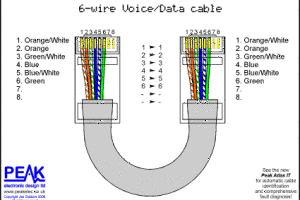
You should now have four wires exposed. Untwist them and lay them with orange on the left, brown on the right, with blue and green staying in the middle. Each wire consists of two wires twisted together — the twisted copper pair — which now must be untwisted. This will leave you with eight strands, place them in this order from left to right: white with orange, solid orange, white with green, solid blue, white with blue, solid green, white with brown, solid brown.

Once the wires are in order, they must be straightened. Using a regular pen, hold it under the wires and run them on top of it, over and over, until they are as straight as possible. Using your regular scissors, cut the exposed, and now straight, wires at an angle. Starting at the brown wire, cut at an upward angle through all eight wires. This will help you to attach the CAT6 piece of the connector. This is painstaking, and you will need to slide each wire individually into the plastic piece. Try not to get frustrated, this is definitely hard to do. Use one pair of pliers to hold the plastic piece, and the other to pull each wire all the way through the piece, to the base of where the wires meet the jacket.

Once all the wires have been threaded, use the regular scissors to cut off all the additional wire tails. At this point, double check the color order of your wires. Now, attach your RJ45 connector and slide it over the plastic piece. Make sure it fits snugly and completely over it. Use your crimping tool to crimp the connector onto the cable. This end of your cable should now look ready to use. Repeat this process on the other end of the cable, so your two ends are identical. Be sure to use a network tester to ensure the functionality of your newly made cable before use.

Why You Should Choose CAT6 Cable

Why You Should Choose CAT6 Cable

We’ve come a long way since the days of coax cables running at a top speed of 10MB/sec. In some instances today, cables are not even required and everything can be done wirelessly. However, for most systems outside the family home, cabling is not only recommended, but generally necessary. In most existing structures, Category 5 (CAT5) cabling is the standard, but with the changing technology landscape, there is a strong case to be made for cabling all new systems with Category 6 (CAT6).

To lay down some basic numbers, CAT5 cable has a 100MHz rating, enabling it a speed of about 100MB per second. CAT5e is very similar, the ‘e’ standing for enhanced, and has a higher test tolerance. CAT6 cable can operate at up to 1GB per second, with a 1,000 MHz rating. Pricing for cables varies from different vendors, but the difference is usually no more than about 5 cents per foot. For example, 1,000 feet of CAT6 will only cost you $50 more than 1,000 feet of CAT5. CAT6 is also designed to be compatible with both CAT5 and CAT5e cabling, so when upgrading, you don’t have to replace everything at once.

Current trends show that data rates have been increasing by 200% every year and a half. This means that if your system has applications that are running at 1 GB per second, you are quickly approaching the limits of even CAT5e cabling. Think of it as doubling the lanes on the highway before the traffic jam occurs – you are simply planning for the future. And as multi-media and video applications become more mainstream, the need for speedy data rates will only go up.

The main selling point for CAT6 is its superb transmission performance. You can expect less near end crosstalk (NEXT), better insertion loss, and equal levels of far end crosstalk (ELFEXT). You will also have a better shield from external noise and generally fewer operating errors overall compared to CAT5 or CAT5e systems.

Of course, as with any system, the real artistry is in the install. You can have a poorly engineered CAT6 network floundering while a properly installed CAT5 system handles the same work load while humming along happily. When installing a new CAT6 system, the expense really comes in everything around the cable. You will want to have everything from your patch panels to your wall plates to your terminators should be of high rating. Otherwise you will find your system experiencing intermittent issues. Also, remember that with the tolerances being closer, you should be sure to hang the cables away from fluorescent lights. And use Velcro over tie wraps so the cable insulation isn’t pinched, which can cause higher levels of crosstalk and jitter.

With any new installation, definitely try to spring for CAT6 over CAT5e. With all the advances being made, it will give your system a shot at keeping up with future technology. For existing networks, use CAT6 whenever laying new cable, as it’s the first step toward an upgrade. You can also add new pieces of infrastructure over time – a switch here, a patch panel there – to slowly ready your infrastructure for an upgrade.

CAT5 vs CAT5e vs CAT6

CAT5 vs CAT5e vs CAT6

There are so many different kinds of cable on the market for transmitting data, that it can be quite difficult to discern which is best for your particular project. This article will deal with the similarities and differences between Category 5 (CAT5) cable, Category 5e (CAT5e) cable, and Category 6 (CAT6).

All of these are twisted-pair copper cable that is used to carry signals. They are most often used in computer networks, but can also be used to move data in home theatre applications. Every cable on the market has product standards set by the Telecommunication Industry Association and the Electronic Industries Association. These three cables have very similar guidelines and differ mostly in their performance level.

CAT5 cable is the most common, and comes in two types — Unshielded Twisted Pair, known as UTP, and Screened Twisted Pair, called SCTP. The SCTP cable has an extra shield to limit outside interference, and is generally only used in Europe. UTP cables are used all over the states and come either solid or stranded. Solid CAT5 cables are stiff and the best choice for long distance transmissions. Stranded CAT5 is more bendy and is often used as patch cable. The standard amount a CAT5 cable can handle is 100MHz, with the option for 10 or 100 Mbps Ethernet. A CAT5 cable can also carry more than one signal — such as two phone lines and a single 100BASE-T channel in one cable.

CAT5e is very similar to CAT5, the ‘e’ standing for enhanced. This cable has more ability for data transmission, with the option to transfer data at 1000 Mbps. Cat5e can also be used with Gigabit Ethernet and generally has less near-end crosstalk, or NEXT than standard CAT5 cables. When installing a new system, CAT5e cables are almost always used over CAT5, though most existing installations are still CAT5.

The most sophisticated of the three cables is CAT6. Although it is also comprised of four pieces of twisted pair copper wire, it has a longitudinal separator. This allows the cables to be separated from each other and, in turn, allows not only for an increased data transfer speed, but less crosstalk and double the bandwidth. CAT6 cabling is a good choice for most new systems, especially those that are evolving and might need more options in the future. CAT6 is perfect for 10 Gigabit Ethernet and can work at up to 250 MHz. The really intelligent aspect of CAT6 is that it is compatible with already installed CAT5 and CAT5e cabling.

With the ever-changing landscape of technology, when you are installing a new system, the best choice for an easily adaptable future is CAT6. However, CAT6 is more expensive, and often some companies just don’t need anything quite that sophisticated. If you are just wanting to expand your network a bit, CAT5e is a more cost-effective and the simpler choice. CAT5, though perfectly adequate for many existing systems, will just not be able to keep up with the speed and performance needs of tomorrow.

Options for Becoming a Network Cabling Technician

Options for Becoming a Network Cabling Technician

For those of you enamored with the world of communications and cabling, the amount of career options at your fingertips can be a little bit staggering at times. However, within this myriad of options, some believe that once a path has been chosen, there is only one way to achieve the necessary training. For network cabling technicians, at least, this couldn’t be further from the truth.

At this time, there is no education requirement to become a network cabling technician. Although two year certifications are becoming more of the norm, some companies require nothing more than a willingness to learn and to work. There are some companies that will hire interested employees, give them in house training, and then send them out to work with provided equipment. However, in these cases, you are generally just installing cable or terminating voice and data jacks. The hope is that you will learn more sophisticated technology on the job over time.

The most common way to break into the network cabling field is through a certification program from a college or vocational school. This will generally take anywhere from 1-4 semesters and will give you a basic understanding of telecommunications as well as hands on teaching with fiber-optics and copper-based networks. Most, but not all, programs require a high school diploma and students are expected to be in good enough shape to dig trenches and lift heavy cables. The program is not recommended to those who are claustrophobic or afraid of heights, as both these situations arise in the field.

To acquire jobs a step above those with a network cabling certification, you must obtain an associate’s degree in computer science or information technology. These programs are two year’s in length and focus not only on hands on training, but on design and maintenance as well. You will learn how to repair damaged cables and how to terminate a line underground. You will also be able to design and build operational networking systems. To apply you must be a high school graduate.

Above and beyond the associate’s level, for those interested in managerial or administrative positions, there are bachelor’s and master’s degrees available in information technology. These are standard college programs and require all the standard university requirements. For all of these options, most of the popular schools only offer classes online. Which is great for time management and those who live far from a university. However, online learning can be difficult, so look to technical institutes for classroom-based programs.

Once you have received your training and education, the next step is simply to get a job. The U.S. Bureau of Labor Statistics states that job options in the telecommunications field are expected to increase in the next two years. They also report the median salary for a network cabling technician to be around $51,000 a year. So if you’d like to be making some money and getting started on your career, decide on a training program, and get started.

Network Cabling Companies Struggling After Sandy

Network Cabling Companies Struggling After Sandy

Hurricane Sandy hit hard and her effects are still being felt by many, especially in New York City. The entire downtown region of Manhattan was basically impassable and thousands were without power. On Monday October 29th, Con Ed cut power to lower Manhattan as an attempt to save the power grid while thirteen feet of storm surge assaulted the city. Con Ed has been working around the clock, and while most facilities have been able to regain heat and lights, data center providers and web hosts are still experiencing issues with their systems.

Most data center operators were prepared enough to have generators, unfortunately, even the generators aren’t fool proof. The NY8 data center for Equinix had to deal with a failed generator, that not only affected their customers, but the other businesses in the building that shared the generator infrastructure and fuel service. NY8 is now up and working, but Equinix reports that five of its locations in the New York/New Jersey area are still running on generator power. They are relying on fuel deliveries to keep the system functioning.

Many data center sites who have experienced basement or sub-basement flooding are finding that the water has ruined the diesel fuel pumps, which means no fuel is being pumped through to the generators. Internap, with an office on 75 Broad Street in downtown Manhattan, issued apologies to its many customers, stating that although their contingency plans allowed for five hours of fuel reserves to keep the power running for sufficient reaction time, they did not account for submerged fuel pumps.

The full list of network and data centers in the city that lost power is still unknown. Outages have been reported from Cogent, HoneLive, XO Communications, ColoCrossing, InterServer and Atlantic Metro, just to give an idea of the scope of this issue. SteadFast’s facility at 121 Varick Street lost peer due to an auxiliary electrical failure. They are working to assist customers in the meantime and have promised to honor full SLA credits for the times that power has been non-existent in the facility.

In an attempt to lend a helping hand, Telehouse America is opening its colocation space in New York City to those companies that need to move their servers to another location for a short term. Telehouse has three different data center facilities in the area, one on lower Broadway, one in Chelsea, and one in Staten Island. They have opened up their cabinets on a one month to sixty day temporary basis.

Hibernia Atlantic, a submarine cable provider, has also been reaching out to help those affected by Sandy. While their network has been completely operational throughout the storm, due to the landing stations being in locations not devastatingly impacted by Sandy, Hibernia has been offering redundant services and rerouting options for other partners and customers.

One week after Hurricane Sandy, almost everyone has power back, and most network cabling companies are operating with full resources. In the long run, it looks like Sandy was a hard lesson in backup and contingency plans.

Prepping a Networking System for a Hurricane

Prepping a Networking System for a Hurricane

When a hurricane comes racing through town, people are generally thinking of the basic amenities like food, shelter, and warmth. Once these necessities are taken care of, it’s time for most to relax on the couch with a stash of candles, a good book and a warm blanket. The power may go out, and there’s not a whole lot anyone can do about it. Well, network cabling companies were trying to prepare as much as possible for the wrath of Hurricane Sandy, to minimize damage and wait times in the aftermath. This begs the question, what can network cabling companies do to prepare for something like a hurricane?

As Sandy came whipping up the northward up the east coast, companies took a variety of different precautions in an attempt to stem the effects of this unpredictable severe weather. FairPoint Communications worked hard to have no interruption in their telephone service by backing up its network on large batteries and generators run on gas. They have also devised an emergency planning team who gathered extra supplies, like cabling and poles, and waited at the ready to dispatch teams wherever any damage took place.
Verizon decided to put all internal training and construction projects on hold so they could dedicate their service to customers in need. They used their resources to create portable cell sites that could quickly replace damaged cell towers, and worked with non-Verizon partners to find equipment to make repairs as efficiently as possible.

Many communication and cabling companies offer hurricane preparation guidelines and checklists for their clients. They recommend that, especially with a large system, you let a professional handle the preparation of core systems to try to reduce any harm to the expensive equipment and also to minimize any down-time after the storm has finished. They strongly encourage taking the latest backup offsite to a safe location, just in case there is building or structural damage. And it never hurts to have multiple drives or copies in various locations. Obviously, the main step to not forget is turning off and unplugging all equipment, including secondary servers, printers, and your network switch. After the storm, once the power has stabilized, if you still require help, these companies can offer hourly network rebuilding services and data recovery; though, hopefully, you won’t need it.

Some companies, like AT&T, are striving to take steps before the hurricane to help those who will inevitably be in need. They set up a donation based texting fund to the American Red Cross, the Salvation Army, and the American Humane Society. The texts are free, all of the proceeds go directly to the charities and customers are charged on their monthly AT&T bill. They also put out some helpful tips for their customers during the storm – keep your phone charged, have a back-up charging plan, forward your home number to your wireless number in case of evacuation, and text message instead of call when possible.

Every company had their own idea of how to prepare, and while there was definitely effort put into the process, the fact remains that storms hold a power we cannot compete with, and sometimes our efforts are in vain. The good news is that the storm damage opens up a lot of new network cabling jobs, so start looking now.

Network Cabling Contractors

Network Cabling Contractors

Network cabling installation has enabled many companies and public corporations to carry out their activities smoothly. Such companies have witnessed an increase in their competency while improving how they activate their daily routines. It is through the input of a network cabling contractor that a firm is able to link with exterior infrastructures. Computers, printers, the Internet and other hardware in an organization are able to connect to one another thanks to cabling services from network cabling companies. Increased bandwidth probability and cabling are the other advantages that accrue to individuals or organizations that engage the services of a network cabling installer.

The business of network cabling has witnessed an intense competition that results from the high demand for these services. This is beneficial for clients since they can haggle efficiently for quality and affordable services. There are many companies or contractors that specialize in network cabling installation services. This is quite evident when scouring through a network cabling directory, which contains names and contacts of various network cabling solutions providers across the country. Thus, customers have a long list of network cabling contractors to select from.

Mistakes made by clients in selecting contractors

The fact that there are many network cabling contractors around presents a problem to clients. Among these contractors, there are some who offer nothing in terms of quality service. Unfortunately, many people or organizations in need of these services have always fallen victims to such ineffective network cabling installation professionals. The following are some of the mistakes that may precipitate these victims’ predicaments:

· Haphazardly choosing the lowest contractor

Some clients have a penchant for compromising on quality services in pursuit of affordable rates. What they do not know is that some of these affordable contractors could be some of the most inept in the market. In most instances, such professionals do not have much experience to handle the network cabling jobs that they undertake. This could be the main thinking behind their low prices. It is important that clients go beyond price considerations and look into the expertise of their desired network cabling companies or contractors.

· Paying exorbitantly

Conversely, the need for quality service should not push someone into paying exorbitantly for network cabling services. This includes forking out a lot of money towards the purchase of modern cabling technologies. Under normal circumstances, the price should not exceed Cat 6 and Cat 5E specifications. Before reaching into their wallets, clients should consider the applications and equipment that they intend to upgrade.

· Failure to obtain a cabling design beforehand

As part of their network cabling jobs, contractors ought to furnish their clients with the design plans for the project. It is quite unfortunate that some organizations tend to overlook this fact. This is a costly error since the project may only have a vague idea of the clients’ realistic contractor qualifications and requirements. It is important that they consult the contractor before the project commences. This will ensure that it moves in the right direction.

· Lack of proper cable management

Many clients also suffer from their susceptibility to poor cable management. This means that they go for contractors that cannot guarantee efficient wire management. Efficient cable management is often dependent on the design produced by the contractors. People in need of these services can opt for contractors who offer efficient designs for managing their cables.

The Importance of Network Cabling Installation

The Importance of Network Cabling Installation

The importance of network cabling installation in many businesses and public institutions cannot be understated. Cabling is needed in improving the day-to-day activities of the organization while sustaining competency. Organizations that undergo proper network cabling are usually connected efficiently to infrastructures in the outside world—this is helpful in spreading their business tentacles. Cables are links that connect the Internet, printers, computers and other hardware on one network. Thanks to the input of an experienced network cabling installer, such agencies in need of these services can also benefit from increased probability of full bandwidth and cabling.

There are many technological firms that specialize in network cabling. This scenario provides those in need of these services with a selection headache. Picking out the right network cabling company from this bunch might turn out to be a daunting exercise. Still, it is important that the right firm should be able to execute an accurate installation, design and administration of the network cable. Fortunately, some guiding factors could be extremely helpful in selecting the right network cable installer. Such factors include:

· Track record

The reputation of the desired company or contractor should inevitably play a major factor. Those that have an impeccable track record should be chosen over those that have tarnished reputations. This is because those with good track records boast of higher chances of fulfilling the job as per the clients’ wishes. While scouring through a network cabling directory, it is imperative to think about the longevity of each network cabling company. A firm that has stayed for a long time in the network cabling sector is most likely to be efficient in the delivery of its services. As a determinant factor, track records should also focus on the experience of the network cabling contractors in these companies.

· Provision of warranty

A company that is notable for its top-notch network cabling solutions is bound to provide its clients with warranties. This is a satisfactory guarantee that assures clients that the installation is above par. In most instances, such firms would provide their clients with a maximum warranty of five years. During this period, they would undertake any repairs or servicing on the network. A structured cabling firm that is hesitant to provide a warranty is less likely to turn up with effective services.

· Support service

While looking for an efficient network cabling firm, it is necessary to consider its support service. In most instances, good companies have 24-hour support services that offer unrestricted access to their clients. This allows those with queries or comments to post them to this department. Furthermore, the support service must be efficient to the extent that the company responds instantly and effectively to the needs of their clients.

· Cost

This is arguably the most dominant factor when choosing a network cabling installation firm. Understandably, most clients would opt for the firm that offers the lowest rates for their services. However, they need to understand that this could sometimes be a wrong choice. When considering price, it is important to engage all the desired network cabling companies. These providers should furnish the clients with a comprehensive price catalogue. The onus is on the customer to balance his or her need for effective service with the desire for affordable services.

Network Cabling Solutions

Network Cabling Solutions

Network cabling, also known as structured cabling, is a system designed for information to be transported from one device or location to another. Usually, a specific environment is involved in the process, whether for a small business or enterprise level systems network.

Computers and their data have become such an integral part of business and daily life that it is inconceivable to imagine the world without them. Networks are in every place from home and business environments to entire cities as an essential part of government operations.

Technology

Building structured network cabling solutions precisely and properly involves many complicated tasks, for example:

  • Optical fiber setup
  • Wireless LAN
  • Routers, switches, bridges and hubs
  • Power communications architectures
  • Network Interface Cards
  • Ethernet Installations
  • Network Services Advantages

Network cabling solutions are part of the backbone structure of any business management system. Companies and business enterprises use their computer networks as effective methods for everything from phone communications to each essential aspect of business operations.

Communications

The degree to which organizations may communicate internally and externally is critical to their success. With adequate structured networks, customers are well serviced, while prospects have access to information and business staff. Without the type of services that network cabling companies provide, business operations as we know them today would not be possible.

Business people and organizations can communicate from virtually any location, at any time with proper network cabling. Effective systems provide productive work environments for all employees, staff, supervisors, management personnel and contractors. This is possible through a cohesive cabling installation that every function of the organization relies upon heavily on a daily basis.

Connectivity

Network cabling installations also connect numerous devices and computers in order to share printers, scanners and other indispensable business machines. Network cabling also provides capabilities for vital interconnections, such as through wireless service networks. Signals are transferred to and from various key points through structured cabling to make this possible.

With a proper network cabling installation staff can access their critical business information and computer systems at any time and from any location. This kind of access to business data and customer information enhances work flow processes and increases productivity exponentially.

A competent network cable installer builds system infrastructure and architecture. Some of the more prevalent benefits that companies get from installing networked systems can include:

1. Effective network cable solutions designed for both voice and data cable information transmission and management.

2. The capability to relocate critical business operations for expansion, temporary uses and other purposes.

3. Efficiently designed communication and computer, business and management systems that are kept up to date through proficient design and maintenance.

4. Budget friendly methods for structured cabling designed as scalable, flexible and effective business management systems.

5. Essential data transfer at top performance for more business productivity.

6. Coordinated network cabling facilities include telephone service, upgrades, jack installation and other key business system aspects.

7. Removable foundations may be simply adapted and quickly reinstalled as frequently as necessary.

8. Organic network infrastructures may adapt without work flow or business disruption.

9. Network cabling installation systems can be suitable for all company sizes, from small, compact offices to mid-size and large enterprises, such as high rise, warehouse, residential complex or industrial settings.

Essential network cabling solutions can be complex to design, install and maintain. This is why it is so important to enlist professionals who can provide the expertise required for the most tailored network cabling options possible.

With advice from these professionals, customers are assured that the correct network cabling solution for voice, data and structured systems will be installed and maintained properly.

New Technology for Lynn University

New Technology for Lynn University

Every four years, the United States comes together in adversity for 90 minutes to view a dueling dialogue between those who will one day lead us all. This year, the final debate between presidential candidates before the election was held on Monday, October 22nd at Lynn University in Boca Raton, Florida. Even more amazing than the way the presidential nominees treated each other during the final debate, is the amount of people that were able to watch it happen – thanks to a highly sophisticated network cabling system provided by Corning Cable Systems.

Corning Cable Systems is a part of Corning Incorporated and is a leader in voice and data applications, video networks, and telecommunications in general. They have offices all across the globe and in Arizona, Texas, and Virginia, with their headquarters in North Carolina. In the past, Corning has produced network cabling and communications solutions in grand locations like the M&T Stadium for the Baltimore Ravens and for huge events like the Super Bowl XLVI.
The final presidential debate in 2008 drew more than 56 million TV viewers and this year’s numbers are expected to be similar. Over 10 major television networks covered the event live, along with hundreds of media and press members. With such a large, high-profile event, there needed to be an incredibly fast networking solution, with no questions on connectivity and a bandwidth with tested and high volume.

Putting on an event of this caliber at a university with a pre-existing network cabling system meant Corning had to find some creative solutions. In order to provide the bandwidth needed, they ended up having to install their LANscape Solutions to enhance the infrastructure. This system is ideal for networks that cannot afford any downtime, and as fiber optics require significantly less upgrades and maintenance than copper cabling, there is rarely a need to replace or fix your cabling systems to keep up with technological demands. On top of this, fiber optics eliminate the danger of electrical shocks or sparks from a current. The network comes with Closet Connector Housings and FREEDM One indoor/outdoor fiber optic cable, as well as UniCam field-installable no-epoxy/no-polish connectors.

Luckily for Lynn University, Corning will leave LANscape Solutions installed after the debate concludes, for the school and students to use. The chief information officer at Lynn University, Chris Boniforti, is excited about this partnership with Corning and hopes it will continue in the future. This new system allows the school to run network equipment at speeds of up to 10G and will allow the school’s infrastructure to keep up with new technology as it hits the market. Not only did Lynn University get to host a momentous event in American political history, complete with the option for students to volunteer and be a part of the developments, but they also received a completely updated telecommunications system for their future use and enjoyment. And technology may soon be further impacting the political scene – in a recent study, students were polled about politics through social media and over 50% stated that, if it were an option, they would vote using their smartphone.

Network Cabling Do’s and Do Not’s

Network Cabling Do’s and Do Not’s

With the internet as a constant source of information, plenty of people are leaning towards the DIY category when it comes to technology projects, including network cabling. Attempting to install cables yourself can definitely be cost effective, but it might be at the price of your sanity. Finding a network cabling solution that actually works is a demanding and exacting process involving many steps. Many people who start a project end up abandoning ship in the middle and calling an expert. Whether you’re doing it at your home or someone else’s here are some cabling tips for both network cabling professionals and wanna-be aficionados.

– DO remember that cable length matters. One hundred meters, or 328 feet, is the maximum cable length allowed by the standards set by the EIA/TIA. And take note that this distance includes your patch leads. If you have two 15 meter patch leads, then you only get to have 70 meters of horizontal cable.

– DON’T go with long patch leads unless absolutely necessary. They will decrease the effectiveness of the system and degrade the electrical signal.

– DO keep all cables dry and cool. A wet environment will affect the copper in the cables and mess with signals. If cabling between buildings, be sure to budget for waterproof conduits and capped ends. Large bundles of cable tend to overhead and also impact the signal, so try to keep to smaller bundles.

– DON’T lay your cable next to other electrical cables or other electrical sources of interference. Other electrical cables will create 50/60Hz current interference and noise spikes, similar to a transformer. Florescent lights will do the same thing, so try to stick to low power lighting or LED’s as they will cause less problems. And put air conditioning on a different power source to minimize power ripples.

– DO plan for the future. Realizing that technology is an ever changing beast and that every company’s needs will change with the times is important when installing a network cabling solution. You don’t have to choose the best and most expensive option – most places won’t need 10 Gbps network connections, ever – but picking products that will give a company room to grow is essential. They may not need to update their system as quickly, but when they do, they are much more likely to choose someone who helped them have a usable system, instead of a quickly antiquated one.

– DON’T crush your cables by overloading your cable trays. Cables stuck at the bottom of a tray can be easily flattened by heavy cables like Cat6. This will lower the effectiveness of the signal. Also, cable trays that are suspended from ceiling or wall mounts can easily fall, ruining your installation, and whatever was originally beneath it.

– DO remember that dust caps actually have an important purpose. They stop dust buildup from getting inside the connector and keep the run length and signal strong and unaffected.

– DON’T skimp by with just doing OTDR testing. It is really just a simple light test and can be cheated easily. Test your Fiber Optic cable with a Power Meter to find out how much light power you’re losing in the terminated cable run.

Network Cabling Contractors Los Angeles

[hozbreak]

Click Here to list your Network Cabling company for
only $29.95 a month

(Increase your company’s visibility. Increase your Business!)

[hozbreak]

Example Listing

Best Installers Inc.

1 Cabling Lane, Los Angeles, CA 90046
Phone: XXX-XXX-XXXX
Fax: XXX-XXX-XXXX
Email: name@yourwebsite.com
Website: www.yourwebsite.com

On average, a potential customer visits this page
every other day!
To be listed click on the link at the top.

If you are a potential customer, please fill out the form on the right and let us know what your requirements are. We will find a company for you.